

Pros
Tablet:+ Gorgeous design
+ Thin and light
+ Frontlight
+ Good tactile writing experience
+ Audio (Speakers & Mic)
+ Android (supports 3rd-party apps)
+ Great reading software
+ Fantastic note-taking software
+ Very powerful and versatile
Firmware review
+ On the cutting-edge of e-ink technologies
+ Wide range of products
+ Regular firmware updates
Brand overview
Cons
Tablet:- Stylus storage
- Terrible folio
- Ghosting (noted here as I the firmware review is still in progress)
- Active stylus
- Steeper learning curve
- Not as intuitive as it could be
- Frequent ghosting (on some models)
Firmware review
- Customer support can be variable
- Unfavourable returns policy when buying direct from Boox
Brand overview
Excellent monochrome Android tablet with Frontlight
TRANSPARENCY NOTICE:
The Go 10.3 Lumi e-ink tablet featured in this article was sent to me free-of-charge by Boox for review purposes.
Like all brands that send me review units, this was on the understanding that I would maintain full editorial control, and that they would have zero influence over the content I write.
I have not been paid any money to write this review, however, I may earn a small commission if somebody clicks on a link to the manufacturer and goes on to make a purchase. This does not incur any additional cost the buyer, but goes a long way to helping support this website and my work (for manufacturers that do not agree to my terms of non-interference above, I have to buy their products myself at full cost).
In short, this is my true and honest opinion of the tablet. I will objectively highlight both good and bad points, as well as provide my own subjective perspective.
Design and Build
If you have read my review of the original Boox Go 10.3 (Gen 1), you will know how impressed I was with its design and construction. That same underlying industrial design has been carried forward almost wholesale into the Boox Go 10.3 (Gen 2) Lumi, and in many respects that is no bad thing at all. The first generation was already a remarkably well-considered device from a physical standpoint, and the newer Lumi variant preserves those same qualities.


The tablet is thin, relatively lightweight, and framed by a metallic trim that runs around the outer edge of the chassis, exactly as it did on its predecessor. This trim lends the device a pleasing sense of refinement while simultaneously reinforcing the structure. The corners are rounded and the edges themselves possess a subtle contour, meaning they are not entirely flat. In the hand, this contouring proves extremely comfortable.
From a purely aesthetic standpoint, the device is also rather elegant. The combination of the slim profile, gently curved edging, and restrained industrial design gives it a minimalistic but sophisticated appearance that I personally find quite appealing.
However, the contouring and thin profile also creates one of the more persistent issues carried over from the first generation: the stylus attachment.
The stylus magnetically attaches to the right edge of the tablet. In theory, this is a convenient solution. In practice, the thinness and curvature of the edge mean that the stylus does not sit particularly securely. It has a tendency to roll forwards and backwards along the edge far too easily. To Boox’s credit, the magnets are much stronger than on the Gen 1, and the magnetic attraction is indeed more noticeable. Unfortunately, the fundamental geometry of the edge remains unchanged, so the stylus still lacks the secure anchoring one might hope for. Whilst it is unlikely to fall off with a knock, as was the case with the previous model, it does not always stay in place.
The folio case attempts to mitigate this with a magnetic flap designed to hold the stylus in place, but in my experience it is only a partial solution. The pen still shifts more than I would like (I will discuss this in greater detail later in the Accessories section.)
Looking around the tablet itself, the physical layout is very straightforward. Both the left and right edges are completely bare, maintaining the device’s clean aesthetic. Along the top edge sits the power button, which protrudes slightly and is therefore easy to locate by touch. There is also a pinhole for the microphone. On the bottom edge you will find the USB-C port for charging and data transfer, accompanied by an indicator LED and dual speakers.


The only truly noticeable physical difference between the first-generation model and the Gen 2 Lumi stems from the addition of the front-light layer. Because of this extra layer, if you view the screen from a shallow angle you can see a very slight gap or shadow between the surface of the screen and the underlying E Ink panel. It is subtle and does not really affect usability too much, but it is noticeable.
In terms of structural integrity, the device feels extremely solid and reassuringly rigid. There is virtually no flex anywhere in the chassis, and I encountered no creaking or rattling during use. The overall sensation is somewhat akin to holding a thin slab of slate – dense, stable, and well-constructed.
Taken as a whole, the design of the Go 10.3 Gen 2 Lumi is both aesthetically pleasing and practically executed. It feels elegant without being fragile, and robust without becoming bulky. My only lingering criticism concerns the stylus retention system. The magnetic approach simply isn’t particularly effective, and I remain somewhat disappointed that Boox has not addressed this more decisively in the second generation. A simple pen loop on the folio or another form of physical stylus storage would arguably have been a more dependable solution.
Aside from that continuing irritation, however, the device remains a very attractive and well-engineered piece of hardware.
Hardware Specs
Moving on to the internal hardware, the Boox Go 10.3 (Gen 2) Lumi receives a rather meaningful upgrade over its predecessor, most notably in the form of its processor.
The device is powered by a Qualcomm Snapdragon 750G octa-core processor, clocked at 2.07 GHz. This represents a substantial improvement over the processor used in the first-generation model, and the difference became very apparent during my benchmark testing.
Using Geekbench 6, the Gen 2 Lumi achieved a single-core score of 727 and a multi-core score of 1742. For comparison, the Gen 1 Go 10.3 managed 312 in the single-core test and 1162 in the multi-core test. These figures represent the average of three benchmark runs, which I typically perform to avoid anomalous results.


When placed alongside the many other devices I have tested, the Gen 2 performs very well indeed. In fact, when you look at my full CPU benchmark comparison table, the Go 10.3 Gen 2 sits near the very top of the list among non-BSR E Ink tablets. The only device I have reviewed that scores higher in that category is the Boox Note Max. For readers unfamiliar with the distinction, I have also written a separate article explaining the differences between BSR and non-BSR E Ink tablets.
Supporting the processor are 4 GB of RAM and 64 GB of internal storage, which is fairly typical for an E Ink tablet in this category. It is not an extravagant specification sheet, but it is certainly sufficient for the type of workloads these devices are designed to handle.
Overall, while the Go 10.3 Gen 2 Lumi is not the single most powerful E Ink tablet currently available, it comfortably sits within the upper tier of performance. In practical terms, it should be capable of running a wide variety of third-party Android applications without too much difficulty.
That said, it is always important to place these performance figures within the broader context of E Ink technology. E Ink displays typically operate with lower refresh rates and lower resolutions compared with LCD or OLED screens. As a result, even when the underlying hardware is relatively capable, the experience of running third-party applications can still be somewhat variable depending on how well those apps adapt to an E Ink display.
In other words, the hardware here is more than adequate, but the nature of the screen technology itself will always impose certain practical limitations.
Screen
The Boox Go 10.3 (Gen 2) Lumi features a 10.3-inch display measured diagonally, which in practical terms is roughly equivalent to an A5 sheet of paper. This size has long been something of a sweet spot for E-Ink tablets. It is large enough to read books, PDFs, and notes comfortably, yet still compact and lightweight enough to remain reasonably portable.
The display itself is monochrome, and to the best of my knowledge it uses an E-Ink Carta 1200 panel. While there are now numerous tablets on the market that incorporate colour E Ink displays, there are still several advantages to remaining with grayscale technology if colour is not essential to your workflow. In particular, monochrome panels tend to offer superior contrast and noticeably crisper text rendering, which remains highly desirable for reading-focused devices.
In terms of resolution, the screen comes in at 1860 × 2480 pixels, with a pixel density of 300 DPI. This results in extremely sharp text and very clean line work when reading or writing. Fonts appear well-defined and smooth, and handwritten notes look suitably precise.


Perhaps the most significant change compared with the first-generation Go 10.3 is the inclusion of a front light. This is actually quite an important addition within Boox’s broader product line. For the past 18 months or so, there has been something of a conspicuous gap in their catalogue: a 10.3-inch monochrome tablet with integrated front lighting (the last such device was the Note Air 3 back in 2023. Personally, this is something I have missed, and I know from conversations with readers that many others have been waiting for exactly this type of device to appear.
The front light itself offers 32 levels of brightness, and the colour temperature can be adjusted to introduce a warmer, reddish tone for more comfortable reading in darker environments. This is particularly useful for night-time reading, where cooler white light can sometimes feel harsh.
However, the presence of a front light does introduce one of the common trade-offs associated with illuminated E Ink displays. Because the lighting layer sits above the E Ink panel, the ink layer is no longer quite as close to the surface of the screen. When viewed from certain angles, there is a small but perceptible gap between the screen surface and the E Ink beneath. For some users this can slightly diminish the feeling that the text or ink is directly on the page, which may subtly affect both viewing and writing comfort. Because it is a monochrome panel, I seldom felt the need to use the fronlight – only when it was particularly dim or dark was it needed. This is in contrast to colour panels, which are inherently darker, and require more frequent frontlight usage.
The display also supports touch input, allowing you to navigate the interface using your finger. In addition, it supports stylus input via a USI active pen. Boox implements this technology under its proprietary InkSense branding. I will explore this in much greater detail later in the writing feel section, but it is worth mentioning here that Boox appears to have made notable improvements to the technology compared with earlier implementations.
There is, however, one issue that I feel obliged to mention even though it relates more to firmware behaviour than the physical display itself – and that is ghosting.
On the Go 10.3 Gen 2 Lumi, there is a fairly noticeable amount of ghosting, which manifests as faint remnants of previous images lingering behind the current screen content. This phenomenon is not unusual with E Ink displays, but it does appear more pronounced here than I would ideally like. In fact, this has been an ongoing issue across several Boox devices since around the time of the Boox Note Max, and unfortunately it persists here.
You can adjust the refresh and optimisation settings to reduce the effect somewhat, but traces of ghosting still tend to remain. My personal workaround has been to configure a manual refresh gesture, which clears the screen entirely. In my case, I set up a swipe from the right edge toward the left to trigger a full refresh, and that reliably removes the residual artifacts.
In the accompanying video I demonstrate both the ghosting behaviour and the gesture configuration that I use to clear it. That said, ideally I would prefer not to have to perform manual refreshes with such regularity. While this workaround is effective, it feels more like a ‘fudge‘ than a true solution.
The encouraging aspect is that this appears to be a software issue rather than a hardware limitation, meaning it could theoretically be resolved in a firmware update. Unfortunately, this ghosting behaviour has persisted across multiple Boox releases over the past year, so I am not particularly optimistic about a rapid fix.
Overall, though, the screen quality itself is very good. The Carta panel delivers strong contrast and crisp text, and the inclusion of a front light – while something of a double-edged sword – will undoubtedly be appreciated by many users. Those who prefer the more traditional non-illuminated E Ink experience also have the option of purchasing the standard variation of the Go 10.3 Gen 2, which omits the front light entirely.
The ghosting does somewhat tarnish an otherwise excellent display experience, but with a manual refresh gesture configured, it becomes manageable, even if it remains a slightly inelegant compromise.
Writing feel
Regular readers of eWritable will know that I have a long-standing tendency to bitch about Active Pens, particularly when compared with EMR (electromagnetic resonance) pens. There are several perfectly legitimate reasons for this preference, which I will come to shortly. Consequently, when Boox first announced that the Go 10.3 Gen 2 would utilise an Active Pen rather than EMR, I must admit that my initial reaction was one of disappointment.
This was especially the case because I thought the EMR stylus supplied with the original Go 10.3 is genuinely one of my favourite styluses to use. It delivered a very natural writing experience, and in my view it suited the device extremely well.
My scepticism was also coloured by previous encounters with Boox’s InkSense technology, which, frankly, had not made a particularly favourable impression on me.
The original version of InkSense debuted last year with the Go 7 and Go Color 7, and in my experience it was really quite poor. Writing with it produced a loud and rather unpleasant tap-tap-tapping sound each time the nib touched the screen. Stroke detection could occasionally fail altogether, the nib itself was somewhat overly wide, and accuracy was inconsistent – marks were often placed slightly offset from where you actually intended them to be.
Because of this, while I considered those smaller tablets to be very capable e-readers, they did not perform particularly well as note-taking devices.
Boox attempted to improve matters in October last year with the introduction of InkSense Plus, which arrived with the Palma 2 Pro. That revision was certainly better. The nibs were thinner and softer, which reduced the harsh tapping sound and marginally improved accuracy. Nevertheless, it still wasn’t particularly impressive (especially on a device with a screen as small as the Palma’s). The surface texture of that tablet was also rather smooth, which meant the stylus felt somewhat slippery when writing, lacking the tactile resistance that many people associate with a more paper-like experience.
Given all of that history, I was genuinely quite surprised to discover that the writing feel on the Go 10.3 Gen 2 Lumi is actually very good! (in fact, it is considerably better than I was expecting)
The stylus exhibits hardly any perceptible lag, and the accuracy is good. As mentioned earlier, there is a very slight separation between the screen surface and the E Ink layer beneath, owing to the front-light assembly. However, the gap is extremely subtle and is really only noticeable if you are deliberately looking for it.
The screen surface itself also provides a modest degree of physical texture. This creates a little friction between the nib and the display, giving strokes a controlled feel rather than sliding too freely across the glass. That said, in my opinion it does not quite possess as much texture as the first-generation Go 10.3.
Whether that is an advantage or a drawback will inevitably come down to personal preference. Personally, I slightly prefer the more tactile and audible feedback of the Gen 1 model. But in practical terms the difference is fairly small, and most users will likely find both experiences perfectly agreeable.
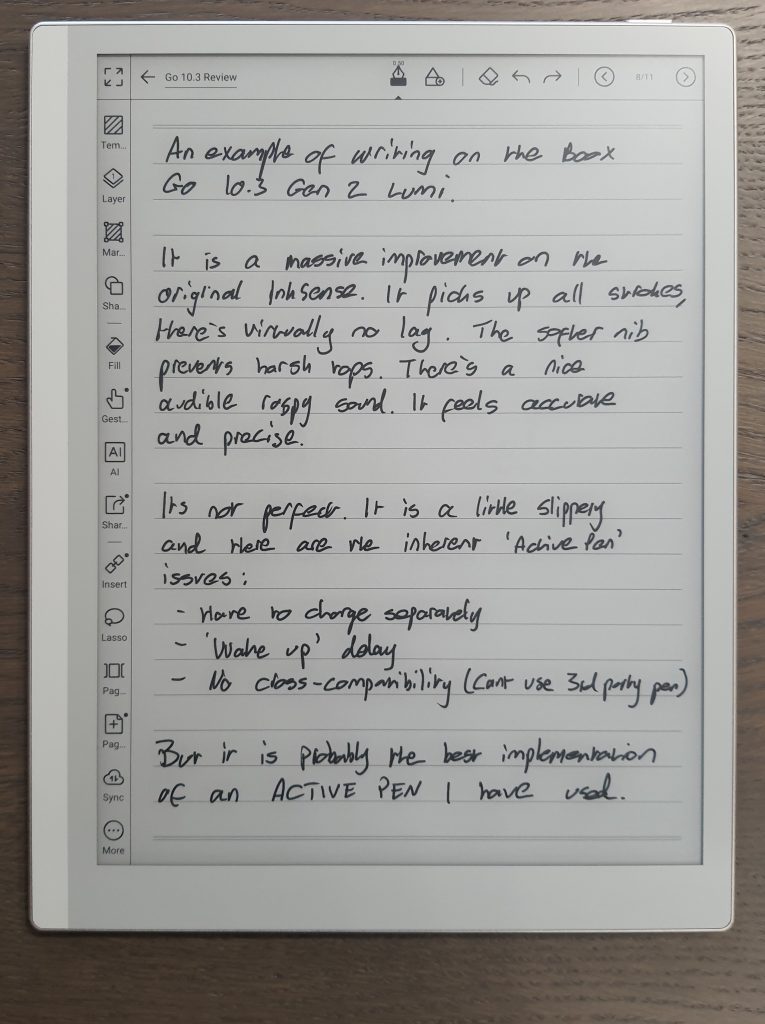
The stylus supports both pressure sensitivity and tilt detection, and during my testing I did not encounter any of the issues that plagued earlier InkSense implementations. In particular, I did not experience missed strokes when writing very small characters or rapid passages of text, which had previously been a recurring annoyance. However, some strokes did look a render somewhat ‘wavy’, rather than straight – at first I though it was just my hand shaking, but over time I came to realise that the software gives lightly-drawn, freehand straight lines a little kink. This was not really noticeable in the small strokes used in writing, but was more apparent with longer strokes in drawing tasks. Because my main use case is for writing tasks, this was not a massive issue, but I imagine it could be for those that do a lot of sketching.
Overall, the writing experience is good and, quite frankly, it is the best implementation of an active stylus that I have encountered on any E Ink tablet I have reviewed.
However – and this is an important caveat – even though I cannot really criticise the InkSense writing performance too much, I still personally prefer EMR styluses. There are several reasons for this preference.
The first is simply power management. Active pens require their own internal battery, which means they must be charged separately. That is one more device to keep track of and one more battery that will eventually degrade over time. Inevitably, the stylus battery will reach the end of its lifespan and the pen will need replacing. EMR pens, by contrast, require no internal power source at all, which makes them wonderfully simple and maintenance-free.
The second issue relates to compatibility. Active pens are typically optimised for a specific device or manufacturer, which makes it difficult to substitute alternative styluses. Even within Boox’s own ecosystem, different implementations – such as InkSense and InkSpire (used on the Tab X C) – are not necessarily interchangeable in both directions.
EMR pens, on the other hand, are largely universal. A single EMR stylus can often be used across multiple tablets from different manufacturers without adjusting the configuration, which provides far greater flexibility.
There is also a smaller but still irritating behaviour that I associate with active pens, which I tend to describe as a sleep timeout. If the stylus is left idle for around ten minutes, it enters a low-power sleep state to conserve battery life. When you pick it up again, the first interaction often fails to register. That might be a pen stroke or a button press, but either way nothing happens.
As a result, you gradually develop the habit of tapping the screen once to wake the pen, fully expecting that first tap to accomplish nothing, before continuing with whatever you actually intended to do. It is not a catastrophic problem, but it is mildly irritating, and it simply does not occur with EMR pens.
And, in all honesty, the writing experience is still not as refined as that of EMR, in my opinion.
Despite those reservations, though, the fact remains that the InkSense implementation on the Go 10.3 Gen 2 Lumi is genuinely impressive. While I still favour EMR technology in principle, I have to acknowledge that Boox has made very substantial progress with this latest iteration.
Hardware features
In addition to the underlying specifications discussed above, the Boox Go 10.3 (Gen 2) Lumi also includes a fairly respectable assortment of hardware features that expand the ways in which the device can be used.
For connectivity, the tablet supports both Wi-Fi and Bluetooth. Wi-Fi naturally enables internet access for tasks such as synchronising files, downloading books, accessing cloud storage, or installing third-party applications. Bluetooth, meanwhile, allows the tablet to connect to a range of peripherals, including external keyboards, headphones, and wireless speakers. This can be particularly useful if you intend to do a lot of typing or wish to listen to audio content without relying on the tablet’s internal speakers.
The device also includes a USB-C port, located on the bottom edge. This can be used for both charging the tablet and transferring files when connected to a desktop or laptop computer. In practical terms, this provides a straightforward and reliable way of moving documents, PDFs, and notes between devices.
As mentioned earlier in the screen section, the Lumi variant includes a front light, which allows the tablet to be used comfortably in low-light environments. This is a feature that had been noticeably absent from Boox’s 10.3-inch monochrome lineup for some time, so its return will likely be welcomed by many users.
The tablet also incorporates dual speakers and a microphone. The speakers can be used for tasks such as listening to podcasts, audiobooks, or internet radio, although it must be said that they are not particularly remarkable in terms of audio quality. The sound is somewhat thin and slightly tinny, but for casual listening or background audio they are perfectly serviceable. The microphone enables functions such as recording voice notes or using voice-to-text features, which can be helpful when capturing ideas quickly without needing to type or write them out manually.
Another small but useful piece of hardware is the integrated G-sensor. This allows the tablet to automatically rotate the screen orientation when the device itself is turned, making it easy to switch between portrait and landscape modes simply by rotating the tablet.
Taken together, these features give the Go 10.3 Gen 2 Lumi a pleasant degree of versatility, expanding its usefulness beyond purely reading and note-taking.
That said, it is worth noting that there are other E Ink tablets on the market that offer a broader array of hardware features. Some competing devices include additions such as fingerprint scanners, cameras, SD card slots, or SIM card support. If one of those particular capabilities is essential to your workflow, the Go 10.3 Gen 2 may not be the ideal choice.
For most everyday uses, however, the hardware provided here feels well balanced and perfectly adequate, even if it does not attempt to be the most feature-laden device in the category.
Battery
The Boox Go 10.3 (Gen 2) Lumi is equipped with a 3700 mAh battery, which is fairly typical for a device of this size and category. With E Ink tablets in particular, the raw battery capacity is often less important than the efficiency of the software and display management, since the screen itself only consumes significant power when refreshing.
To assess real-world performance, I carried out my usual hour-long battery tests, measuring how much charge is depleted while performing specific activities.
| Test (1hr) | Go 10.3 Lumi (% battery used) |
|---|---|
| Note-taking | 5% |
| Reading | 1% |
| Wifi On | +1% |
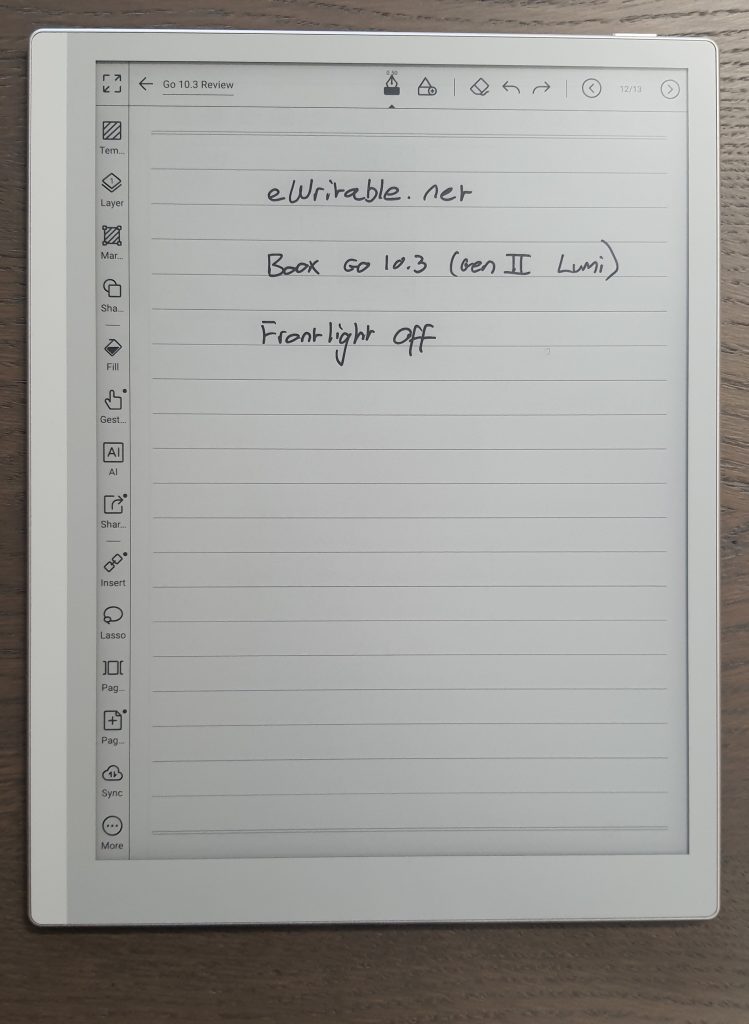
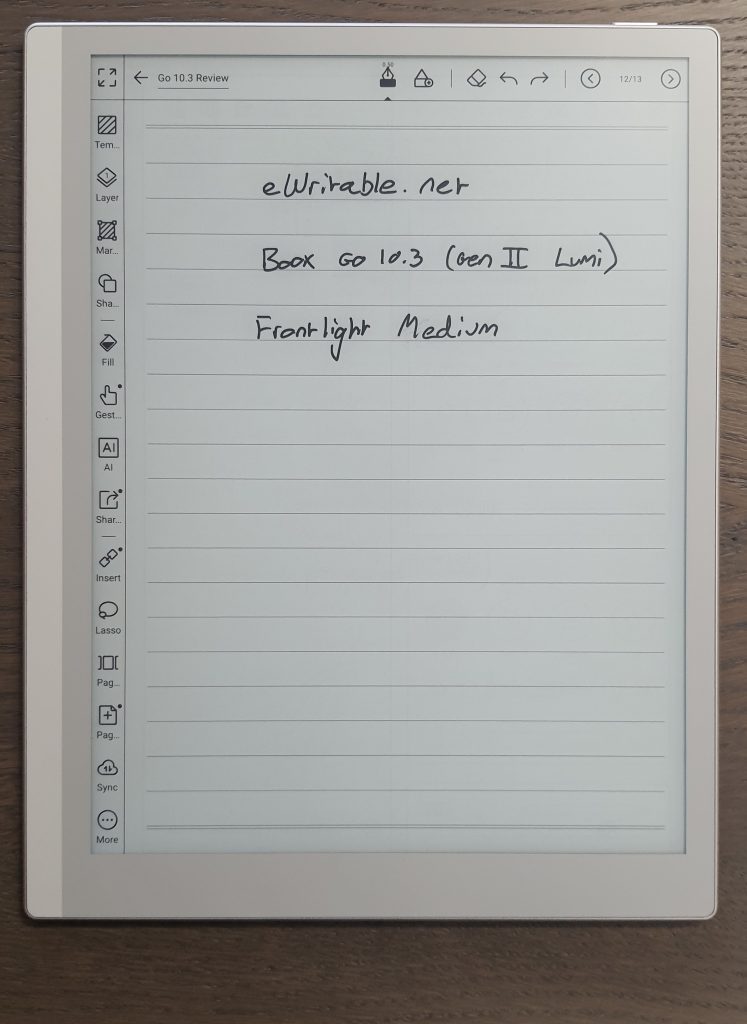
| Frontlight (medium) | +1% |
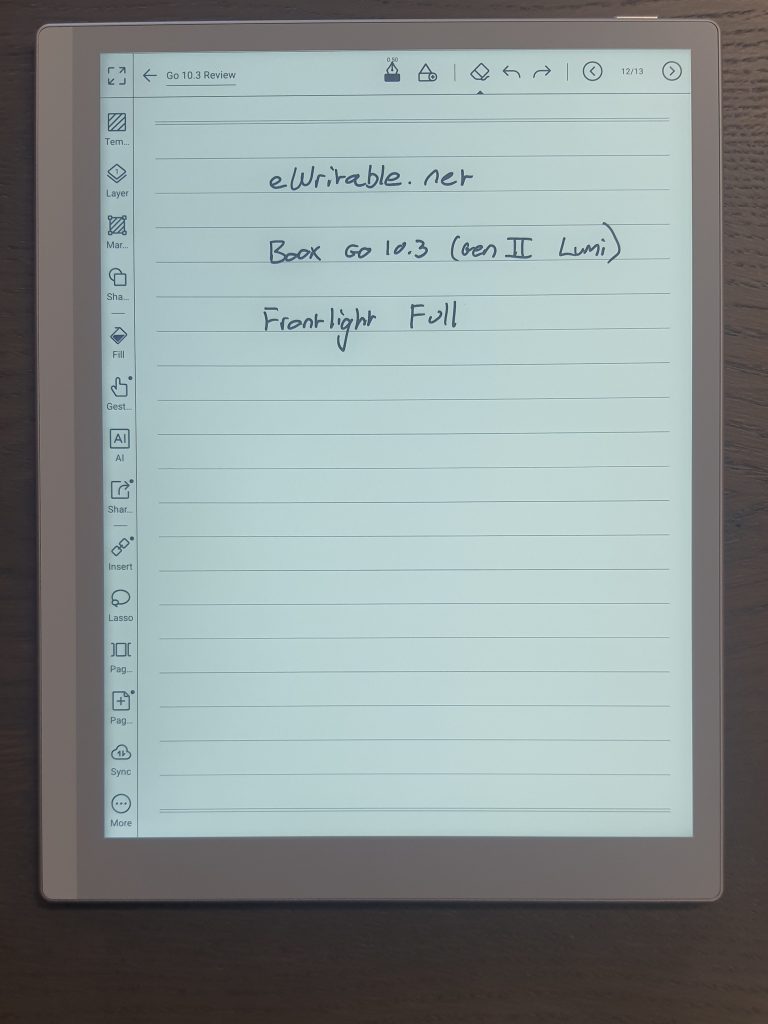
| Frontlight (full) | +6% |
During testing, I found that one hour of using the note-taking application consumes roughly 5% of the battery, while one hour of reading uses only around 1%. This difference is largely due to the additional screen refreshes that occur while writing. Connectivity and lighting naturally introduce additional power consumption. If Wi-Fi is enabled, you can expect the device to use approximately an extra 1% per hour. Likewise, if the front light is set to a medium brightness, it also consumes around an additional 1% per hour. If the front light is pushed all the way up to maximum brightness, the extra consumption increases significantly to roughly 6% per hour.
To estimate typical day-to-day battery life, I use a hypothetical scenario that reflects a fairly common usage pattern: three hours of note-taking and three hours of reading per day.
Under those conditions, the tablet would consume around 18% of its battery each day, which equates to approximately 5.6 days of use between charges (assuming both Wi-Fi and the front light are turned off).
If you were to perform the same six hours of daily use with the front light set to a medium level, the daily consumption rises to roughly 24%, which translates to about 4.2 days of battery life.
Compared with other devices I have reviewed, this places the Go 10.3 Gen 2 Lumi slightly above the average in terms of battery endurance. It is certainly not the longest-lasting E Ink tablet I have tested, but it is also far from the worst.
Interestingly, it does not quite match the endurance of the first-generation Go 10.3, which in my testing managed around eight days of use before requiring a full recharge – I may have to go back and retest the Gen 1 because things might have changed due to the firmware updates since my original test.
One final observation from my testing is worth mentioning. While conducting the battery tests, I set both the sleep timeout and the automatic power-off timeout to “never”, to ensure the tablet remained active during measurements. At one point I became distracted with another task and left the tablet sitting idle on my desk at 100% battery for roughly five hours.
When I returned, the battery indicator still showed 100%.
This suggests that the tablet exhibits very little passive battery drain when powered on but not actively in use, which is always reassuring to see.
Accessories
The primary accessories supplied with the Boox Go 10.3 (Gen 2) Lumi are the stylus and the protective folio case. I have already discussed the writing performance of the stylus in the previous section, so here I will focus more on its physical design and practicality, along with the folio itself.
Stylus
In terms of design, the stylus has a slightly unusual shape. If you imagine a circular cylinder where two opposing sides have been flattened, you will have a fairly accurate mental picture. The body is finished in silver metallic, and it feels reasonably substantial in the hand.


In fact, it has noticeably more heft than the EMR stylus that shipped with the first-generation Go 10.3. That additional weight is most likely the result of two factors: the integrated battery required for the active stylus technology and the metallic outer casing.
The nib itself is thin and made from plastic, which means that, as with most styluses of this type, it will gradually wear down over time and will need to be replaced periodically. The point is slightly thicker than the nib on the Gen 1 stylus, though the difference is not especially dramatic.
There is no eraser on the top of the pen, but there is a side button that can be held down to activate the eraser function. Personally, I am not particularly fond of side buttons because I occasionally trigger them inadvertently while writing. For many users, however, the ability to instantly switch to an eraser without interrupting the writing flow will be seen as a benefit.
Aside from the occasional accidental press of the side button, I did not encounter any real problems while using the stylus. As mentioned previously, while I still personally prefer EMR pens, this is easily the best active stylus implementation I have used on an E Ink tablet.
The main issue, unfortunately, is not the stylus itself, but rather how it is stored with the device. As discussed earlier, the stylus does not attach particularly securely to the side of the tablet, and the folio does not really solve that problem either…
Folio Case
The supplied folio cover is finished in a bright orange colour, with an exterior that has a grippy faux-leather texture. The interior, by contrast, is smooth and somewhat plasticky.
The design itself is extremely simple. It consists of a front panel and a rear panel connected by a central fold, which acts as the spine in a book-style configuration. The rear panel also includes an additional fold, allowing the cover to be bent into a stand for landscape viewing.
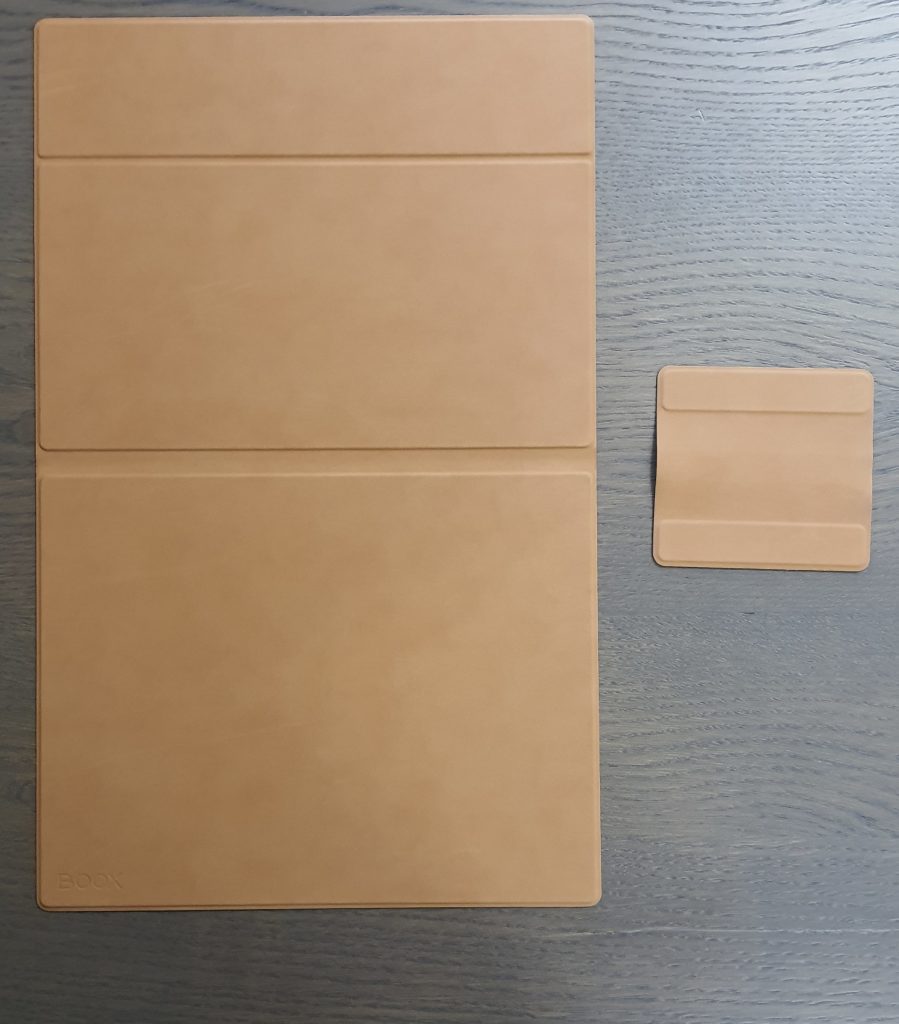
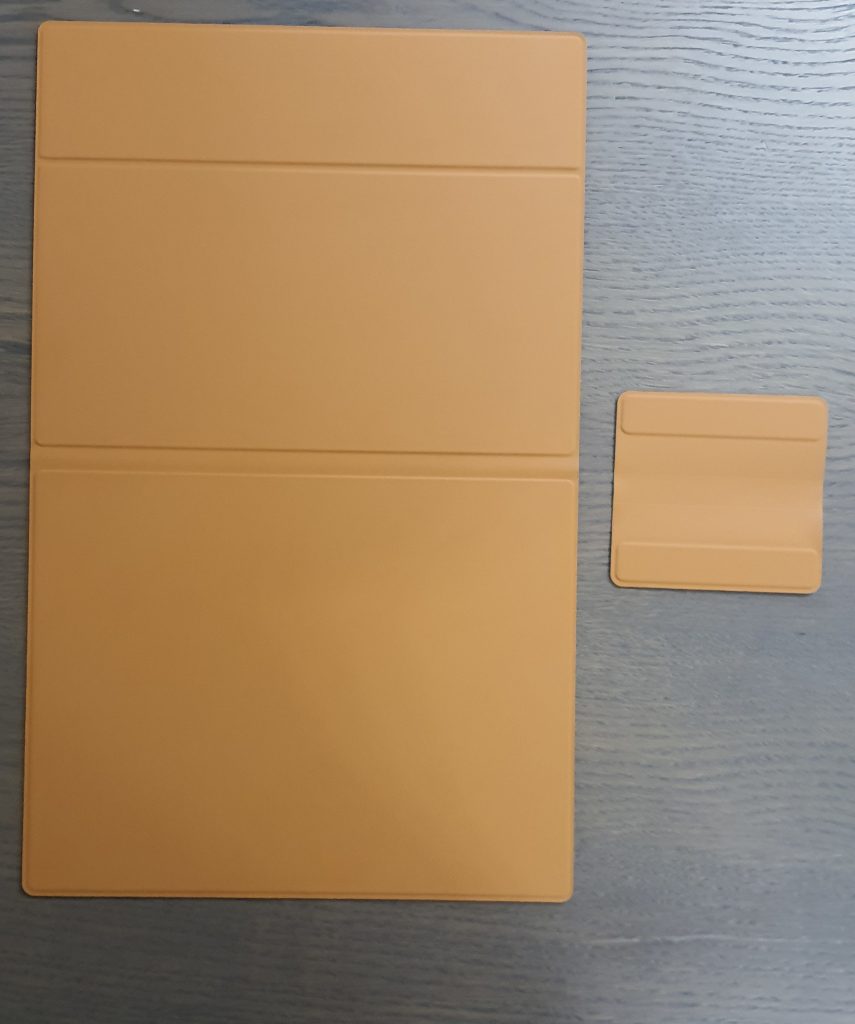
In practice, however, this stand arrangement is not particularly stable. The problem is that the smooth metallic edge of the tablet rests directly against the smooth plastic interior of the folio, and there are no grooves or indentations to anchor the viewing angle. As a result, the tablet can easily slide out of position, and the entire arrangement tends to wobble when you tap the screen. A workaround i to use the magnetic flap as wedge to stop it shifting forward, but it still moves when you tap the screen an in my opinion, it is simply not fit for purpose as a stand.
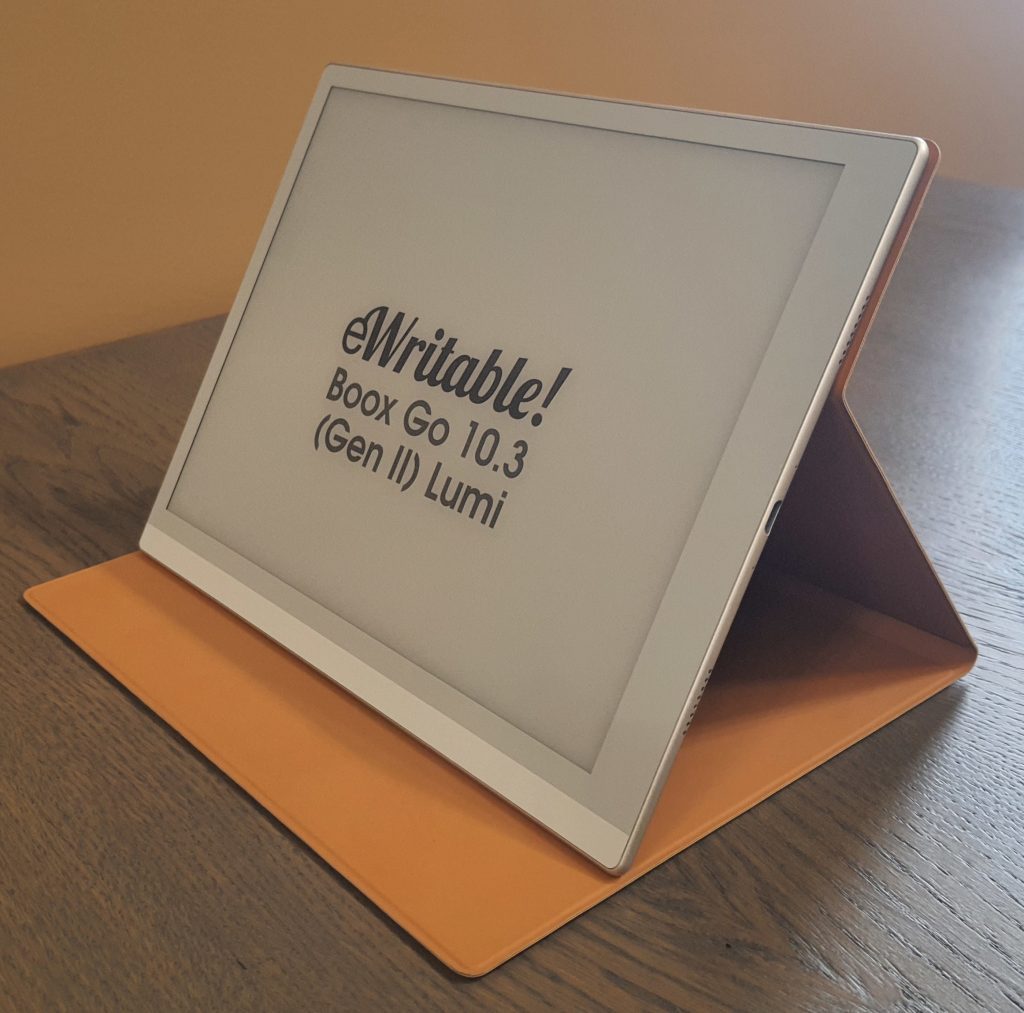
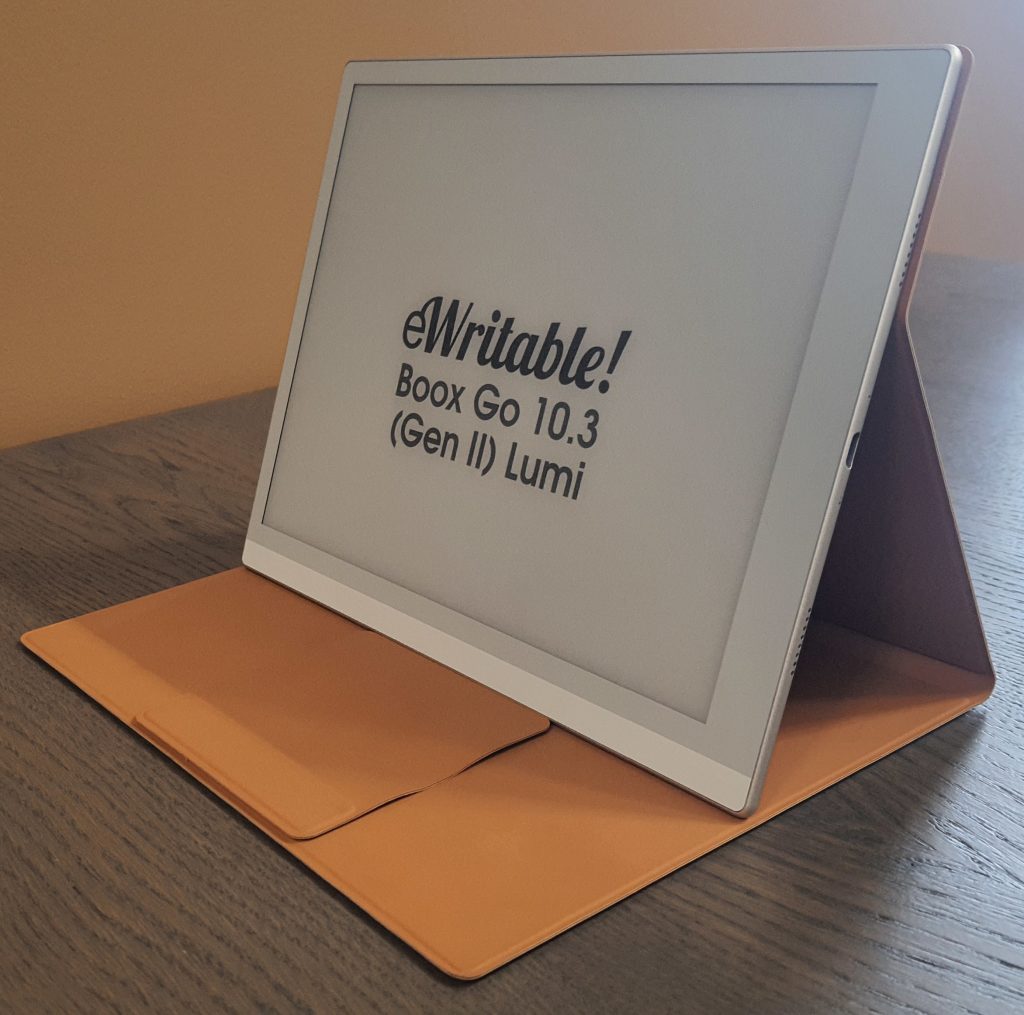
The tablet itself attaches to the folio via magnets embedded in the interior panel. The magnetic hold is not exceptionally strong, but it is sufficiently secure that the tablet will not come loose without deliberate effort. As such, the folio does provide a reasonable level of protection during everyday use.
The front cover does have a small amount of free movement, but that is fairly typical for simple magnetic folios. When closed, a light magnetic attraction helps keep the cover shut. The magnet is intentionally weak, which in this case is actually appropriate 0 you do not want to struggle to open the cover, but you do want to prevent it from flopping open while inside a bag. In that respect, it performs perfectly adequately.
The main flaw of the folio, however, relates once again to stylus storage.
Compared with the first-generation model, the magnets on the side of the tablet do appear stronger, which does reduce the likelihood of the stylus falling off during normal handling. Nevertheless, it can still be fairly easily dislodged, particularly when the device is placed inside a bag. Particularly because the edges of the folio overlap the tablet slightly, so on the side with the stylus there is a tendency for the folio to be pushing the stylus away from the tablet, undermining the effect of the stronger magnets.
Boox has attempted to mitigate this by including a detachable magnetic flap designed to hold the stylus in place. Unfortunately, this solution introduces problems of its own.
Firstly, the flap is a completely separate component from the folio, which means it is very easy to misplace or lose. Secondly, once you remove it, you are often left wondering where to put it, which simply results in another small accessory cluttering your desk or bag.
Even more frustratingly, while the flap does reduce the likelihood of the stylus falling away entirely, what it often does instead is push the stylus inside the folio, where it ends up resting against the screen. This is not just a theoretical concern, it has actually happened to me on multiple occasions when taking the tablet out of my bag, only to discover that the stylus had slipped inside the folio and was lying directly on the display.
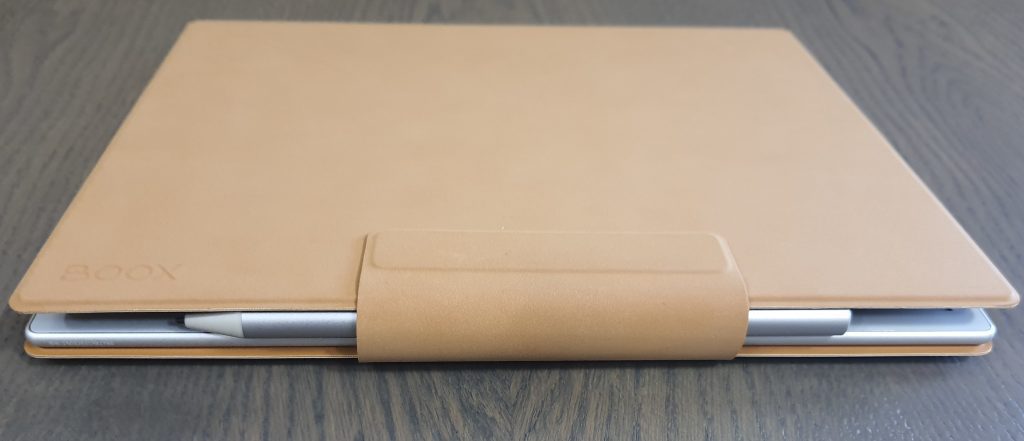
So while the folio does an okay job of protecting the tablet, it is not particularly effective as a stand, and it fails to provide a satisfactory solution for stylus storage.
This is especially disappointing because, aside from the exterior and interior textures, it is almost identical to the folio that shipped with the first-generation Go 10.3, and therefore suffers from the same design shortcomings. I had rather hoped that Boox would take the opportunity to address these issues in the second generation, but unfortunately that does not appear to have happened.
Software
My review of this tablet should be read in conjunction with my review of the current firmware (see table below), which includes aspects such as the Operating System, User Interface, and Native Apps.
Not long after I started reviewing this tablet, the firmware updated (from 4.1 to 4.2) and at the time of publication of this review, I have not yet updated my firmware review (for 4.2). This will be completed very soon. In the meantime, you can good idea of the Boox firmware by checking my version 4.1 review.
The hardware and software reviews have been separated because the firmware used at the time that this review was written may not be the same firmware being used currently. This could result in the review quickly becoming outdated. Also, as several tablets may use the same firmware, this would mean going back and updating every single tablet review from a particular manufacturer to account for the new firmware. By splitting them up, if there is a firmware update, I am able to make the updates on a single page.
Current versions of this brand’s firmware are shown in the table below, along with the tablets running them.
| My rating | Firmware version | Tablets using this firmware |
|---|---|---|
| 4.3 (current version) Sep 2026 | Boox Note Air6 C | |
| 4.2 (current version) Apr 2026 | Boox Go 10.3 Gen 2 Boox Go 10.3 Gen 2 Lumi Boox Go 6 Gen 2 | |
| 4.1 (current version) Aug 2025 | Boox Go 10.3 Boox Note Air5 C Boox Palma 2 Pro Boox Note Air3 Boox Note Air4 C Boox Note Air3 C Boox Go 7 Boox Go Color 7 | |
| 4.0 (current version) Oct 2024 | Boox Note Max Boox Tab X C Boox Tab X Boox Tab Ultra C Pro Boox Tab Mini C Boox Tab Ultra Boox Max Lumi 2 Boox Tab Ultra C Boox Note Air2 Plus Boox Note 5 | |
| Older Boox firmware versions may be found here | ||
Brand
For some people, it is also worth considering the brand as whole, including aspects like customer service, ecosystem, values, and criticisms.
My full overview of the Boox brand can be found here, but I have provided a summary below.
Boox*

+ On the cutting-edge of e-ink technologies
+ Wide range of products
+ Regular firmware updates
- Customer support can be variable
- Unfavourable returns policy when buying direct from Boox
Boox are a well-established Chinese brand who manufacture a wide range of tablets that are very versatile and can be used for variety of tasks.
Customer support is okay (not the worst, but not the best either), and there are concerns about them violating the GPL licence by not publicly releasing code they have modified for the Linux kernel.
Final Verdict
Putting everything together, I can honestly say that I genuinely like the Boox Go 10.3 (Gen 2) Lumi.
In many respects it fills a gap that has been conspicuously absent not only from Boox’s own product range, but from the E Ink market as a whole. For quite some time there has been a lack of a well-equipped, Android-based, 10.3-inch monochrome E Ink tablet with a front light. For many users (including myself) that combination of features is extremely appealing.
When the device was first announced, I was somewhat sceptical about the move to an active stylus. I still have a soft spot for the EMR pen that came with the first-generation Go 10.3, and in principle I continue to prefer EMR technology. That said, I cannot really complain about the writing experience here because it is genuinely very good. In fact, I am exceptionally impressed by how much Boox’s InkSense technology has improved over the past year.
My criticisms of the active stylus are therefore less about the writing performance itself and more about the inherent compromises of active pens: the need to charge the stylus, the lack of broad cross-compatibility, and the slightly irritating wake-up delay when the pen enters sleep mode.
Where I am considerably less enthusiastic is with the folio case.
The folio feels extremely basic, almost generic, and somewhat like an afterthought rather than a thoughtfully engineered accessory designed specifically for the tablet. This is particularly noticeable because the tablet itself is such an attractive piece of hardware. The folio feels oddly mismatched to it.
The stand function simply does not work very well, the design includes an awkward magnetic flap that detaches from the case, and the stylus management is frankly rather poor. On several occasions I have removed the tablet from my bag only to find that the stylus had been pushed inside the folio and was resting against the screen, which is not a situation I am particularly comfortable with.
Personally, I have ended up discarding the magnetic flap entirely and simply storing the stylus in a separate compartment of my rucksack rather than keeping it attached to the tablet.
To be fair, the folio will protect the tablet reasonably well, which is ultimately its primary purpose. But it could be so much better. What makes this more frustrating is that it is almost identical to the folio supplied with the first-generation Go 10.3. Boox have had several years to refine and improve the design, yet many of the same shortcomings remain. So, whilst my criticism of the folio may sound rather harsh, I believe that in this case I believe it is entirely justified.
On the positive side, battery life and CPU performance are both comfortably above average. They may not be the absolute best in their respective categories, but they are more than sufficient for the kinds of tasks these devices are designed to perform. The inclusion of speakers, a microphone, Wi-Fi, Bluetooth, and USB connectivity also adds a welcome degree of versatility, particularly for users who wish to connect peripherals such as external keyboards or headphones.
Without delving too deeply into the software side of things, it is worth noting that Boox has, for several years now, offered some of the most comprehensive native reading and note-taking applications available on E Ink devices. Because the tablets run Android and support the Google Play Store, users also have access to a very wide selection of third-party applications.
The ghosting issue that I mentioned earlier is unfortunately very real, and by this point Boox really should have addressed it more effectively. Fortunately, configuring a gesture for manual screen refresh makes it relatively easy to clear the artifacts when they appear. It is not an elegant solution (really the software should be managing this automatically) but it does at least mitigate the problem.
So, the device is not perfect.
However, in my opinion it is currently the best Android-based monochrome 10.3-inch E Ink tablet with a front light that you can buy. And that particular category is one that I know a great many potential buyers have been waiting for. For that reason alone, I would not be surprised if the Go 10.3 Gen 2 Lumi proves to be a very popular device.
Personally, I could quite happily see myself using it as a daily device, were my own requirements not already covered by the Supernote Manta and the Boox Palma. In fact, I like it so much that I am actively trying find a use for it, so I don’t have to put it in storage now that the review is finished!
So, despite the criticisms I have mentioned, I am still very comfortable recommending it to anyone looking for a capable, flexible, and well-designed E Ink tablet for reading and note-taking tasks.
Buying options
The Boox Go 10.2 Gen II Lumi can be purchased from:
Tablet Overview
| PRODUCT | Boox Go 10.3 Gen 2 Lumi |
|---|---|
| Product image | [Affiliate link]We may earn a commission if you buy this product  |
| Notes ⓘ Any additional notes | Excellent monochrome Android tablet with Frontlight |
| My rating ⓘ My own subjective rating | 👍 Recommended |
| Awards ⓘ eWritable Awards: There are gold and silver medals for a range of categories | 🏆WINNER Best Value |
| Approx. price (USD) ⓘ Approximate price at last check (in USD) | $450* |
| Buy ⓘ A link to the best distributor based on your geographical location | * |
| Buying options ⓘ A list of places to buy the device from | Boox Store* Amazon* E-Reader (CA)* Boox Store (EU)* eBay* |
| Screen size ⓘ The size of the screen (measured across the diagonal) | 10.3" |
| Brand | Boox |
| Operating system | Android 15 |
| Screen type ⓘ The type of e-ink screen used | Carta |
| Screen resolution (BW) ⓘ Monochrome screen resolution | 1860 x 2480 (300PPI) |
| Screen resolution (Color) ⓘ Color screen resolution | - |
| CPU ⓘ Speed and cores of the CPU | Octa-core |
| CPU Benchmark (single) ⓘ The single core CPU benchmark | 727 |
| CPU Benchmark Multi ⓘ The multi core CPU benchmark | 1742 |
| RAM ⓘ The amount of memory on the device | 4Gb |
| Storage capacity ⓘ The amount of storage capacity on the device | 64Gb |
| Battery ⓘ The capacity of the battery (in milliamps per hour) | 3700mAh |
| Battery life ⓘ Typical battery life (based on some assumptions) | 5.6 days |
| Release year ⓘ The year that the device was launched | 2026 |
| Buy ⓘ A link to the best distributor based on your geographical location | * |
| HARDWARE | Boox Go 10.3 Gen 2 Lumi |
| Frontlight ⓘ If the device has its own light source (for reading in dim/dark conditions) | ✓ |
| Color screen ⓘ If the device can display colours | ⨯ |
| Fast refresh rate) ⓘ If the device has hardware/software that can improve performance in certain apps (e.g. web browsing, animation etc) | ⨯ |
| Wacom EMR ⓘ If the device uses a Wacom EMR layer for stylus input | ⨯ |
| Speakers ⓘ If the device has onboard an speaker(s) | ✓ |
| Microphone ⓘ If the device has an onboard microphone | ✓ |
| Bluetooth ⓘ If the device has Bluetooth connectivity | ✓ |
| Optional keyboard folio ⓘ If the device has an official folio with built-in keyboard | ⨯ |
| G-Sensor ⓘ If the device automatically re-orientates the screen between portrait/landscape when it is physically rotated | ✓ |
| Ceramic tip ⓘ If the device supports ceramic tips that don't wear down and never need replacing | ⨯ |
| Fingerprint scanner ⓘ If the device has a built-in fingerptint scanner for security | ⨯ |
| MicroSD card slot ⓘ If the device supports MicroSD cards | ⨯ |
| Rear camera ⓘ If the device has a rear-facing camera | ⨯ |
| Front camera ⓘ If the device has a front-facing camera | ⨯ |
| Waterproof ⓘ If the device is waterproof (has an IPX rating) | ⨯ |
| Replaceable battery ⓘ If the battery can easily be replaced by the owner | ⨯ |
| Page turn buttons ⓘ Whether it has physical page turn buttons | ⨯ |
| Dimensions (w x h) ⓘ Physical dimensions of the tablet (width x height/length in millimetres) | 183 x 235mm |
| Thickness ⓘ The physical thickness/thinness of the tablet (in millimetres) | 4.8mm |
| Weight ⓘ The physical weight of the tablet (in grams) | 364g |
| Weight (with folio) ⓘ The weight of the device when inside the official folio | unknown |
| Weight (with kb folio) ⓘ The weight of the tablet and official keyboard folio (where available) | unknown |
| Tablet rating ⓘ Rating of the tablet (hardware and accessories only) without taking into account the firmware/brand. |
Read review
👍 Recommended |
| Buy ⓘ A link to the best distributor based on your geographical location | * |
| SOFTWARE | Boox Go 10.3 Gen 2 Lumi |
| Firmware ⓘ The version of firmware currently available (and link to details) | 4.2 |
| Google Play Store ⓘ If the device supports installation of third-party Android apps from the Google Play Store | ✓ |
| Kindle support ⓘ If the device supports the installation of the Kindle app | ✓ |
| Handwriting search ⓘ If the device support searching for word in your handwriting | ✓ |
| Handwriting-to-text conversion ⓘ If the device supports converting your handwriting into text | ✓ |
| Insert shapes ⓘ If the device supports inserting shapes into your notebooks | ✓ |
| Insert images ⓘ If the device supports inserting images into your notebooks | ✓ |
| Draw straight lines ⓘ If the device supports easily drawing straight lines | ✓ |
| Desktop/mobile app ⓘ If the brand has a proprietary app for accessing your books or notebooks from other devices | ⨯ |
| Native apps ⓘ A list of the native apps that come pre-installed with the firmware | E-reading, Note-taking, Web Browser, AI Assistant, BooxDrop, Calendar Memo, RSS Reader, Audio Player, Audio Recorder, Calculator |
| Supported cloud drives ⓘ Cloud drives supported by the firmware (for saving your files externally) | Proprietary, Google Drive, Dropbox, OneDrive, OneNote, WebDav, AliYun, Baidu, Evernote, NutStore, Readwise, Youdao, Zotero |
| Brush types ⓘ A list of the brush types in the note-taking app | Pen, Fountain Pen, Calligraphy Pen, Paintbrush, Ballpoint Pen, Pencil, Marker |
| PRODUCT | Boox Go 10.3 Gen 2 Lumi |
| Buying options ⓘ A list of places to buy the device from | Boox Store* Amazon* E-Reader (CA)* Boox Store (EU)* eBay* |
| Buy ⓘ A link to the best distributor based on your geographical location | * |
| PRODUCT | Boox Go 10.3 Gen 2 Lumi |
