

Pros
Tablet:+ Inexpensive
+ Portable (small, light, and 'pocketable')
+ Frontlight
+ Excellent screen clarity
+ MicroSD
+ Microphone
+ Android (supports 3rd-party apps)
+ Great reading software
+ Fantastic note-taking software
+ Very powerful and versatile
Firmware review
+ On the cutting-edge of e-ink technologies
+ Wide range of products
+ Regular firmware updates
Brand overview
Cons
Tablet:- Small screen/writing canvas
- Poor comparative CPU performance (although only an issue if running 3rd party apps)
- Below average battery life
- Nowhere to store the stylus
- Rear panel a bit too smooth/slippery
- Steeper learning curve
- Not as intuitive as it could be
- Frequent ghosting (on some models)
Firmware review
- Customer support can be variable
- Unfavourable returns policy when buying direct from Boox
Brand overview
A compact android e-reader with stylus support
TRANSPARENCY NOTICE:
The Go 6 (Gen II) e-ink tablet featured in this article was sent to me free-of-charge by Boox for review purposes.
Like all brands that send me review units, this was on the understanding that I would maintain full editorial control, and that they would have zero influence over the content I write.
I have not been paid any money to write this review, however, I may earn a small commission if somebody clicks on a link to the manufacturer and goes on to make a purchase. This does not incur any additional cost the buyer, but goes a long way to helping support this website and my work (for manufacturers that do not agree to my terms of non-interference above, I have to buy their products myself at full cost).
In short, this is my true and honest opinion of the tablet. I will objectively highlight both good and bad points, as well as provide my own subjective perspective.
This article was:
- Inspired by the Boox Go 6 Gen 2*
- Drafted on the Supernote A5 X2 Manta*
- Typed up on the reMarkable Paper Pro*
I have been using the Boox Go 6 (Gen II) for just over a week now, and this is my full, in depth review.
During that time, I have used it primarily as an eReader because, in my opinion, its compact dimensions naturally lend themselves to reading. To put it through its paces, I read Foundation’s Edge in its entirety and reached roughly halfway through Foundation and Earth. If you enjoy expansive science fiction, I can wholeheartedly recommend the Foundation series*, and indeed pretty much anything written by Isaac Asimov.
Reading has certainly been my primary focus, but I have also spent a considerable amount of time evaluating the writing and note taking experience. In addition, I installed a selection of third party Android applications to see how well the device copes with tasks beyond its intended purpose and to gain a broader understanding of its overall capabilities.
Design & build
With its 6 inch display, the Boox Go 6 (Gen II) is an exceptionally compact device. It is small enough to slip comfortably into a trouser pocket, making it easy to carry wherever I go. It is also remarkably lightweight, yet still feels reassuringly solid. There is no creaking when pressure is applied to the chassis and no rattling when the device is shaken, giving the impression of a well manufactured and robust product.


The edges are gently contoured and the corners are more generously rounded than those of the previous generation, making the tablet comfortable to hold for extended reading sessions. The power button is located on the top edge, while the USB C port and microSD card tray are positioned on the bottom edge. A tray removal tool is included in the box. The left and right edges are otherwise free from buttons or connectors.


Anyone familiar with the original Go 6 will immediately notice that the overall dimensions are almost identical. The most obvious physical differences are the softer contours around the edges and corners, together with a completely redesigned rear panel. Whereas the first generation had a flat back, the Gen II adopts a corrugated texture formed from a series of raised ridges.


At first glance, this textured design appears as though it should improve grip. In practice, however, I found the opposite. The plastic used on the Gen II feels smoother and less tactile than that of the original model. The first generation has a slightly rubberised finish that creates more friction against the fingers, making it feel more secure in my hand. By comparison, the Gen II allows my fingers to slide across the surface more easily. I am not suggesting that it is excessively slippery or likely to fall from my hand, but I do think the original offered a more confident grip.
Interestingly, this became less noticeable after several days of use. Whether the surface simply became less polished through normal handling or accumulated enough natural oils from my hands to increase friction, I cannot say, but it did become noticeably grippier over time. Even so, it never quite matched the reassuring feel of the first generation.
That said, the new textured rear panel is pleasant to touch. The shallow grooves sit comfortably beneath the fingertips and give the device a distinctive appearance. My criticism is directed more at the finish of the material than the pattern itself.
Overall, I think Boox has produced a very well built device. It is lightweight, highly portable and comfortable to use one handed, while the softer contours on the edges are a genuine improvement over the original Go 6. Although I personally prefer the more rubberised rear panel of the first generation, the smoother finish of the Gen II is only a minor criticism and certainly not something that would prevent me from recommending the device.
Hardware specs & performance
The Boox Go 6 (Gen II) is powered by a Qualcomm Snapdragon 665 processor, paired with 3 GB of RAM. By the standards of most modern Android eInk tablets, these are relatively modest specifications. The Snapdragon 665 is now over five years old, and many competing devices offer both a more modern processor and at least 4 GB of memory.

That does not mean the hardware is inadequate. For its intended workload, such as reading ebooks, annotating PDFs, taking notes and carrying out light web browsing, I found the performance perfectly acceptable. Navigating around the operating system feels reasonably responsive, with menus opening quickly and general interaction remaining smooth enough that the hardware rarely draws attention to itself.
Where the limitations become more apparent is when running more demanding third party Android applications or attempting to multitask between several apps. The Go 6 simply does not have the processing power or memory headroom of larger and more expensive eInk tablets. If you regularly switch between multiple applications, you should expect background apps to close in order to free up memory, and more demanding software may struggle to perform consistently.
Ordinarily, I would include Geekbench 6 benchmarks so that the processor can be compared directly with other eInk devices I have reviewed. Unfortunately, I was unable to obtain a benchmark on the Go 6. Geekbench 6 was not available to install through the Google Play Store on my device, so I downloaded the APK and installed it manually instead. Although the application launched successfully, every benchmark attempt ended in a crash before completion, despite trying numerous times. Whether this was due to the limited available memory or another compatibility issue, I cannot say with certainty, but it does mean I cannot provide directly comparable benchmark scores for this review. A fair assumption would be that processing is slower than any of the other devices I’ve tested.
There is 32 GB of internal storage, which can be expanded by up to 1 TB using the integrated microSD card slot. For anyone with a large ebook library or extensive PDF collection, this is a genuinely useful feature.
Ultimately, the hardware needs to be considered in the context of what the Go 6 is designed to be. This is first and foremost a compact eReader with handwriting capabilities, not a general purpose Android tablet. While it can run third party applications, that should be viewed as an additional convenience rather than its primary function.
More powerful eInk tablets undoubtedly deliver a smoother experience with demanding Android applications, but even the fastest models still cannot completely replicate the responsiveness of a conventional LCD or OLED tablet. The Go 6 falls further towards the reading end of that spectrum. If your primary activities are reading ebooks, annotating documents and taking handwritten notes, the hardware is more than capable. If, however, your intention is to use numerous third party applications or rely heavily on multitasking, this is probably not the device best suited to those requirements.
Screen
As mentioned earlier, the Go 6 (Gen II) features a 6 inch monochrome eInk display with a resolution of 1072 × 1448 pixels, and a pixel density of 300 PPI.
Elsewhere on eWritable I have discussed the advantages and disadvantages of monochrome and colour eInk displays in much greater detail. In summary, monochrome panels generally produce sharper text, higher contrast, less visible grain and a brighter appearance than their colour counterparts. As a result, the front light will usually be used less and you get what I would describe as a more natural reading experience. Unless you specifically need colour for your workflow, I generally recommend choosing a monochrome display. They also tend to be more affordable.
That is certainly true of the Go 6. During my testing I read a couple of ebooks and only found myself using the front light when reading in bed at night. The display remained comfortable to read for extended periods, with crisp text and excellent contrast that never caused me to strain my eyes.

PDF documents were a slightly different story. As with any 6 inch device, fixed layout PDFs can be difficult to read because an entire A4 page has to be displayed on a relatively small screen. Fortunately, Boox’s native reading application offers an extensive range of viewing options. In most cases, switching to landscape orientation and displaying half a page at a time transformed the experience and made documents perfectly usable.


One aspect that particularly impressed me was the lack of ghosting. When I recently reviewed the Go 10.3 (Gen II), I was highly critical of its persistent ghosting, particularly as it was running firmware version 4.2. The Go 6 (Gen II) ships with the same firmware, yet the ghosting is dramatically reduced. I would not say it has the very best ghosting control I have seen on an eInk device, but it is vastly superior to the Go 10.3 (Gen II). Based on that observation, I no longer believe the issue can be attributed solely to the firmware. Instead, it appears that the hardware itself, or the way the display has been tuned on that particular model, is likely to play a significant role.
The display is illuminated by an integrated frontlight offering 28 brightness levels, together with adjustable warm lighting that introduces a reddish tint for more comfortable reading in the evening.
As with all frontlit eInk displays, there are a couple of compromises. The lighting layer creates a small gap between the surface you touch and the point where the text or ink actually appears. The separation is minimal, but some users may notice it and feel that it slightly detracts from the illusion of writing directly onto paper. Likewise, the front light produces subtle shadows around the inside edges of the black bezels. Again, this is only a minor effect, but it does create the impression that you are looking through a thin sheet of transparent plastic or glass rather than directly at the display itself.

The screen also supports capacitive touch input, allowing you to navigate the interface using taps, swipes and long presses just as you would on any Android tablet. In addition, it supports handwriting using the Boox InkSense stylus. I will discuss the writing experience in the next section, but it is worth mentioning here that the display does not appear to have a textured surface layer or screen protector. As a result, the writing surface feels smoother than other eInk tablets that use textured films to better replicate the feel of paper.
Writing feel
Over the past year or so, I have written extensively about my preference for EMR stylus technology over active pen and USI based solutions. To date, I have yet to use an active stylus that, in my opinion, matches the overall writing experience offered by a good EMR implementation.
The Go 6 (Gen II) uses Boox’s InkSense active pen technology, which is based on the USI protocol, and I have to say that this is one of the better implementations I have used. Pen tracking is accurate, latency is low and, for the vast majority of the time, the stylus behaves exactly as I would expect.
Because the display incorporates a front light, there is a very slight gap between where the pen touches the screen and where the digital ink appears. This creates a subtle parallax effect. It is minimal, but it is there, and some users will notice it more than others.
The stylus itself also has a slightly broader tip than many EMR pens, which gives the impression of marginally reduced precision. Again, this is only a subtle difference, but when combined with the smooth screen surface it contributes to the feeling that you are writing on a glass screen rather than paper.
For me, that smoothness is the weakest aspect of the writing experience. There is very little texture or friction between the nib and the screen, so it glides across the display more readily than I would like. Personally, I prefer a little more resistance, as it provides greater control and more closely resembles writing on paper.
On the positive side, I experienced very little input latency, and unlike some earlier InkSense implementations, I did not encounter problems with fast handwriting or very small writing causing strokes to be missed. That is a significant improvement. I did, however, notice a handful of occasions where strokes written close to the bottom edge of the display were not reproduced exactly as intended. This occurred only intermittently, and I have been unable to determine the exact cause.
It is worth considering whether a 6 inch display is appropriate for the type of note taking you intend to do. I found that I could fit only around three sentences on each page before needing to move on to the next. For quick reminders, shopping lists, annotations or short notes, this is perfectly acceptable. For longer writing sessions, such as journalling, meeting notes or essays, I found the limited screen area became restrictive. A larger-screened device is simply more practical for that style of work.
Overall, I would describe the writing experience as competent rather than exceptional. From a functional perspective, it performs well. The latency is low, the handwriting is accurate and, for the most part, the stylus keeps up with my writing without issue. What it lacks is the tactile authenticity that I have come to expect from the best EMR devices. The smooth surface, lack of texture, and relatively low friction never quite let me forget that I was writing on a screen rather than paper.
Finally, as with any active stylus, there are a couple of practical considerations. The pen must be charged separately, unlike a passive EMR stylus. And active pens can occasionally enter a low power state, which can sometimes result in a slight delay before the first stroke appears after a period of inactivity. These are not major inconveniences, but they are irritations that are worth bearing in mind if handwriting is going to be one of your primary uses for the device.
Additional hardware features
As you would expect from a modern eInk tablet, the Go 6 (Gen II) includes both WiFi and Bluetooth for connectivity. Bluetooth support allows you to pair compatible accessories such as headphones, speakers and keyboards, extending the device’s versatility beyond simply reading ebooks.
Unlike most other Boox tablets, however, the Go 6 does not include integrated speakers. As a result, any audio output must be routed through Bluetooth headphones or speakers. There is, however, a built in microphone, allowing you to record voice notes or use applications that require audio input.
The USB C port serves a dual purpose, supporting both charging and data transfer between the tablet and a computer.
One omission worth mentioning is the lack of a G sensor. This means the display does not automatically rotate when you turn the device. Instead, screen orientation must be changed manually within the software. While this is not a major inconvenience, automatic rotation is a feature that many users have come to expect from modern tablets.
Another omission is the absence of dedicated physical page turn buttons. Navigation is performed entirely using the touchscreen, with taps and swipe gestures used to turn pages. Personally, I do really enjoy the auditory and tactile feedback and convenience of physical buttons, particularly on smaller devices when reading one handed, but this is a very minor gripe.
Although the tablet includes only 32 GB of internal storage, this is likely to be more than adequate for the vast majority of ebook and PDF libraries. Should you need additional capacity, storage can be expanded using a microSD card via the dedicated card tray on the bottom edge of the device.
Taken together, these hardware features give the Go 6 a reasonable degree of flexibility. The microphone enables voice recording, Bluetooth allows the connection of external accessories, and expandable storage makes it practical to carry a substantial digital library. Nevertheless, the feature set is intentionally modest compared with many larger Android eInk tablets, some of which also include integrated speakers, fingerprint readers, G sensors, physical page turn buttons or even cameras.
Personally, I do not see these omissions as significant drawbacks. The Go 6 is clearly designed to be a compact reading and note taking device rather than an all purpose Android tablet. Including additional hardware would almost certainly have increased both the size and the price without offering meaningful benefits to the audience this device is aimed at.
Battery
The Boox Go 6 (Gen II) is powered by a 1500 mAh battery, which is relatively small compared with many Android eInk tablets. However, it is also one of the smallest eInk tablets currently available, so I was interested to see how well that modest capacity translated into real world usage.
During my testing, one hour of note taking consumed approximately 7% of the battery. Reading an ebook proved to be considerably more efficient, using only around 2% per hour.
Enabling WiFi increased battery consumption by roughly 1% per hour, while the front light had a more noticeable effect. At a medium brightness setting, it consumed an additional 2% of battery per hour, rising to approximately 9% per hour at maximum brightness. In practice, though, I rarely found myself needing to use the front light at its highest setting.
| Test (1hr) | Go 6 Gen 2 (% battery used) |
|---|---|
| Note-taking | 7% |
| Reading | 2% |
| Wifi On | +1% |
| Frontlight (medium) | +2% |
| Frontlight (full) | +9% |
Based on my testing, someone using the tablet for three hours of note taking and three hours of reading each day could expect to consume around 27% of the battery. That equates to approximately 3.7 days between charges. If the front light were used at a medium brightness throughout that time, daily consumption would rise to around 39%, reducing battery life to roughly 2.6 days between charges.
While these figures are not the most impressive I have seen from an eInk tablet, neither are they disappointing. They place the Go 6 towards the lower end of the battery life spectrum compared with many competing devices, but that needs to be viewed in context. This is an exceptionally compact and lightweight tablet designed with portability and affordability in mind. Fitting a substantially larger battery would almost certainly have increased both the size and weight of the device, as well as its overall cost.
For the audience this tablet is aimed at, I think the battery life represents a reasonable compromise rather than a significant weakness – and if it is used more for reading tasks than note-taking tasks, battery life should be significantly better.
Accessories
The Boox Go 6 Gen 2 was shipped with a protective cover (folio). The InkSense stylus has to bought separately, but I already have a couple lying around from previous reviews of Boox tablets.
InkSense Stylus
I am not going to spend too much time discussing the stylus because this is the same InkSense pen that Boox has included with several of its recent products.
Its shape is broadly cylindrical but with two flattened sides, giving it a slightly oblong profile. Towards the lower end is a button, which is configured as an eraser by default, while the top end of the opposite side houses a USB C charging port and a small LED charge indicator.


Personally, I have never been particularly fond of buttons positioned on the barrel of a stylus because I have a habit of pressing them accidentally while writing. Likewise, the fact that the InkSense pen requires charging is, in my opinion, an inherent disadvantage compared with passive EMR styluses, which never need to be recharged. There is also no eraser built into the top of the pen, but personally I don’t tend to use these when present anyway.
The pen itself is constructed from metal and feels solid, but the smooth finish is not ideal for long writing sessions. As my hand becomes sweatier, I find my fingers gradually sliding down the barrel. The plastic nib provides a small amount of friction, but not enough for my liking. As I mentioned in the previous section, the overall writing experience remains rather smooth and lacks the paper like resistance that I enjoy.
Despite those criticisms, the stylus performs reliably. Tracking is accurate, latency is low and, from a purely functional standpoint, it does exactly what it is supposed to do.
One aspect that I find considerably more frustrating is that neither the tablet nor the official folio provides anywhere to store the stylus. It does not magnetically attach to the side of the device, nor is there a pen loop or dedicated holder. As a result, the pen has to be carried separately, making it far easier to misplace.
Folio Cover
The official folio continues Boox’s recent philosophy of keeping accessories simple. It consists of two rigid panels covered in a synthetic leather effect material on the outside, with a smoother finish on the inside. The panels are joined by a flexible spine, allowing the cover to open and close like a conventional book.


The tablet attaches magnetically and snaps into position with a reassuringly strong connection. While the folio is closed, the tablet feels very secure and is unlikely to become detached accidentally. If the cover is opened and shaken, however, the magnetic connection can be broken – but in practical terms, I don’t think this is likely to happen in day-to-day use. A magnetic clasp also helps keep the front cover closed during transport, and the slightly raised edges provide a modest degree of protection should the device be dropped.
Unfortunately, the folio suffers from exactly the same shortcoming as the tablet itself: there is still nowhere to store the stylus. If you regularly use the Go 6 for handwritten notes, you will often find yourself searching your bag for both the tablet and the pen separately. And (in my experience) the stylus has an unfortunate habit of disappearing into the smallest pocket or compartment available.

Overall, I cannot say I am particularly enthusiastic about the official folio. It fulfils its primary purpose of protecting the tablet, but it feels rather basic and somewhat inexpensive in its construction. More importantly, the absence of any integrated stylus storage feels like a missed opportunity. For a device that supports handwriting, I would have expected Boox to provide a more elegant solution for keeping the pen with the tablet at all times.
Software
My review of this tablet should be read in conjunction with my review of the current firmware (see table below), which includes aspects such as the Operating System, User Interface, and Native Apps.
The hardware and software reviews have been separated because the firmware used at the time that this review was written may not be the same firmware being used currently. This could result in the review quickly becoming outdated. Also, as several tablets may use the same firmware, this would mean going back and updating every single tablet review from a particular manufacturer to account for the new firmware. By splitting them up, if there is a firmware update, I am able to make the updates on a single page.
Current versions of this brand’s firmware are shown in the table below, along with the tablets running them.
| My rating | Firmware version | Tablets using this firmware |
|---|---|---|
| 4.3 (current version) Sep 2026 | Boox Note Air6 C Boox Note Mini C Boox Palma 3 | |
| 4.2 (current version) Apr 2026 | Boox Go 10.3 Boox Go 10.3 Gen 2 Boox Go 10.3 Gen 2 Lumi Boox Note Max Boox Palma 2 Pro Boox Go 6 Gen 2 Boox Tab X C Boox Note Air5 C Boox Tab Ultra C Pro Boox Go 7 Boox Go Color 7 | |
| Older Boox firmware versions may be found here | ||
Brand
For some people, it is also worth considering the brand as whole, including aspects like customer service, ecosystem, values, and criticisms.
My full overview of the Boox brand can be found here, but I have provided a summary below.
Boox*

+ On the cutting-edge of e-ink technologies
+ Wide range of products
+ Regular firmware updates
- Customer support can be variable
- Unfavourable returns policy when buying direct from Boox
Boox are a well-established Chinese brand who manufacture a wide range of tablets that are very versatile and can be used for variety of tasks.
Customer support is okay (not the worst, but not the best either), and there are concerns about them violating the GPL licence by not publicly releasing code they have modified for the Linux kernel.
Final verdict
Perhaps the most appealing aspect of the Boox Go 6 (Gen II) is its price. At under $200, it is one of the most affordable eInk writing tablets currently available, providing both handwriting support and access to the Android ecosystem without requiring a substantial investment.
Naturally, that lower price comes with compromises.
The 6 inch display inevitably limits how much handwriting you can fit onto a page, making the device far better suited to short notes and annotations than extended writing sessions. At the same time, that compact display is also one of its greatest strengths, allowing the tablet to slip comfortably into a trouser pocket and making it genuinely easy to carry everywhere. My only real frustration is that there is still no elegant way to transport the tablet, folio and stylus together.
The writing experience is perfectly functional, but I would not describe it as exceptional. Likewise, the battery life is adequate rather than class leading. On the other hand, like all Boox devices, the native reading and note taking applications are very comprehensive, and Android support means you can install a wide range of third party applications if you wish.
That said, the Snapdragon 665 processor and 3 GB of RAM inevitably impose limitations. More demanding applications and heavy multitasking are likely to expose the modest hardware, so I would not view the Go 6 as a general purpose Android tablet. It is capable of running many third party applications, but that capability should be regarded as an added bonus rather than the primary reason for buying it.
Where the Go 6 really excels is as an eReader. The sharp 300 PPI monochrome display is a pleasure to read on, the front light works well when required, and Boox’s native reading software provides an impressive range of viewing and document handling options. Applications such as Kindle and Kobo are also relatively undemanding, meaning they run comfortably on the available hardware.
The handwriting functionality should be viewed in much the same way. It is an excellent feature to have available when you need to jot down a quick reminder, annotate a document or capture an idea while away from your desk. However, if your primary objective is long form note taking, journalling or writing lengthy documents, a larger-screened tablet will almost certainly prove to be a better choice.
Similarly, if your main priority is running numerous third party Android applications, you would probably be better served by a more powerful eInk tablet with faster hardware and additional memory. Boox itself offers several such models, as do manufacturers such as Bigme. Likewise, those seeking a dedicated handwriting device may prefer a larger tablet from Boox, Supernote or Viwoods.
The folio is disappointing. To me, it feels like the absolute bare minimum – it will protect the device to a degree, but that’s about it. And the lack of adequate stylus storage continues to be a problem for many Boox tablets across their range.
But, ultimately, I think the Boox Go 6 (Gen II) is good, and I feel it succeeds because it understands what it is trying to be. It is first and foremost a compact eReader that also happens to support handwriting and Android applications. Those additional capabilities are valuable, but they are secondary to its primary purpose rather than defining features.
If your priorities are reading ebooks, carrying a lightweight device wherever you go, making the occasional handwritten note and perhaps using a handful of lightweight Android applications, the Go 6 (Gen II) performs those tasks admirably. Its attractive sub-$200 price also makes it an excellent entry point for anyone curious about eInk writing tablets, but unwilling to invest in a significantly more expensive device before deciding whether the platform is right for them.
Buying options
The Boox Go 6 Gen 2 is currently available for pre-order from:
In due course, it should also be available from Amazon*.
Tablet Overview
| PRODUCT | Boox Go 6 Gen 2 |
|---|---|
| Product image | [Affiliate link]We may earn a commission if you buy this product 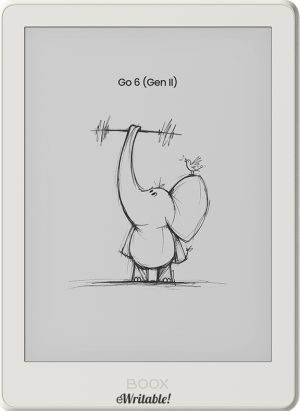 |
| Notes ⓘ Any additional notes | A compact android e-reader with stylus support |
| My rating ⓘ My own subjective rating | 👍 Recommended |
| Awards ⓘ eWritable Awards: There are gold and silver medals for a range of categories | 🏆WINNER Best Budget 🥈RUNNER-UP Best Pocket-Sized |
| Approx. price (USD) ⓘ Approximate price at last check (in USD) | $190* |
| Buy ⓘ A link to the best distributor based on your geographical location | * |
| Buying options ⓘ A list of places to buy the device from | Boox Store* Amazon* E-Reader (CA)* Boox Store (EU)* eBay* |
| Screen size ⓘ The size of the screen (measured across the diagonal) | 6" |
| Brand | Boox |
| Operating system | Android 11 |
| Screen type ⓘ The type of e-ink screen used | Carta |
| Screen resolution (BW) ⓘ Monochrome screen resolution | 1072 x 1440 (300PPI) |
| Screen resolution (Color) ⓘ Color screen resolution | - |
| CPU ⓘ Speed and cores of the CPU | 2.0GHz Octacore |
| CPU Benchmark (single) ⓘ The single core CPU benchmark | 0 |
| CPU Benchmark Multi ⓘ The multi core CPU benchmark | 0 |
| RAM ⓘ The amount of memory on the device | 3Gb |
| Storage capacity ⓘ The amount of storage capacity on the device | 32Gb |
| Battery ⓘ The capacity of the battery (in milliamps per hour) | 1500mAh |
| Battery life ⓘ Typical battery life (based on some assumptions) | 3.7 days |
| Release year ⓘ The year that the device was launched | 2026 |
| Buy ⓘ A link to the best distributor based on your geographical location | * |
| HARDWARE | Boox Go 6 Gen 2 |
| Frontlight ⓘ If the device has its own light source (for reading in dim/dark conditions) | ✓ |
| Color screen ⓘ If the device can display colours | ⨯ |
| Fast refresh rate) ⓘ If the device has hardware/software that can improve performance in certain apps (e.g. web browsing, animation etc) | ⨯ |
| Wacom EMR ⓘ If the device uses a Wacom EMR layer for stylus input | ⨯ |
| Speakers ⓘ If the device has onboard an speaker(s) | ⨯ |
| Microphone ⓘ If the device has an onboard microphone | ✓ |
| Bluetooth ⓘ If the device has Bluetooth connectivity | ✓ |
| Optional keyboard folio ⓘ If the device has an official folio with built-in keyboard | ⨯ |
| G-Sensor ⓘ If the device automatically re-orientates the screen between portrait/landscape when it is physically rotated | ⨯ |
| Ceramic tip ⓘ If the device supports ceramic tips that don't wear down and never need replacing | ⨯ |
| Fingerprint scanner ⓘ If the device has a built-in fingerptint scanner for security | ⨯ |
| MicroSD card slot ⓘ If the device supports MicroSD cards | ✓ |
| Rear camera ⓘ If the device has a rear-facing camera | ⨯ |
| Front camera ⓘ If the device has a front-facing camera | ⨯ |
| Waterproof ⓘ If the device is waterproof (has an IPX rating) | ⨯ |
| Replaceable battery ⓘ If the battery can easily be replaced by the owner | ⨯ |
| Page turn buttons ⓘ Whether it has physical page turn buttons | ⨯ |
| Dimensions (w x h) ⓘ Physical dimensions of the tablet (width x height/length in millimetres) | 109 x 149mm |
| Thickness ⓘ The physical thickness/thinness of the tablet (in millimetres) | 6.8mm |
| Weight ⓘ The physical weight of the tablet (in grams) | 160g |
| Weight (with folio) ⓘ The weight of the device when inside the official folio | unknown |
| Weight (with kb folio) ⓘ The weight of the tablet and official keyboard folio (where available) | unknown |
| Tablet rating ⓘ Rating of the tablet (hardware and accessories only) without taking into account the firmware/brand. |
Read review
👍 Recommended |
| Buy ⓘ A link to the best distributor based on your geographical location | * |
| SOFTWARE | Boox Go 6 Gen 2 |
| Firmware ⓘ The version of firmware currently available (and link to details) | 4.2 |
| Google Play Store ⓘ If the device supports installation of third-party Android apps from the Google Play Store | ✓ |
| Kindle support ⓘ If the device supports the installation of the Kindle app | ✓ |
| Handwriting search ⓘ If the device support searching for word in your handwriting | ✓ |
| Handwriting-to-text conversion ⓘ If the device supports converting your handwriting into text | ✓ |
| Insert shapes ⓘ If the device supports inserting shapes into your notebooks | ✓ |
| Insert images ⓘ If the device supports inserting images into your notebooks | ✓ |
| Draw straight lines ⓘ If the device supports easily drawing straight lines | ✓ |
| Desktop/mobile app ⓘ If the brand has a proprietary app for accessing your books or notebooks from other devices | ⨯ |
| Native apps ⓘ A list of the native apps that come pre-installed with the firmware | E-reading, Note-taking, Web Browser, AI Assistant, BooxDrop, Calendar Memo, RSS Reader, Audio Player, Audio Recorder, Calculator |
| Supported cloud drives ⓘ Cloud drives supported by the firmware (for saving your files externally) | Proprietary, Google Drive, Dropbox, OneDrive, OneNote, WebDav, AliYun, Baidu, Evernote, NutStore, Readwise, Youdao, Zotero |
| Brush types ⓘ A list of the brush types in the note-taking app | Pen, Fountain Pen, Calligraphy Pen, Paintbrush, Ballpoint Pen, Pencil, Marker |
| PRODUCT | Boox Go 6 Gen 2 |
| Buying options ⓘ A list of places to buy the device from | Boox Store* Amazon* E-Reader (CA)* Boox Store (EU)* eBay* |
| Buy ⓘ A link to the best distributor based on your geographical location | * |
| PRODUCT | Boox Go 6 Gen 2 |
